
App Store Rejections
App Store Rejection Reasons: A 2026 Index of 80+ Real Rejections
80+ App Store and Google Play rejection reasons that actually fire in 2026 — the November 2025 guideline changes, the Xcode 26 mandate, age-rating overhaul, with fixes and citable rules.
A rejection letter gives you two things: a guideline number and a couple of sentences. The work of figuring out what you actually did — and what edit gets you approved on the next pass — is left to you. This page does that translation for the 80+ rejection reasons that genuinely fire in 2026, across both stores.
The stakes are mostly time. Apple rejects a large share of first submissions; Google approves more on the first pass but takes apps down after launch far more readily, through automated policy scans that don’t care that you’re asleep. Either way, what a rejection really costs is the re-submission loop: the launch date that slips, the marketing push that lands on a dead listing, the users who installed version 1.0 and never saw the fix.
Every entry below covers what the letter says, why it was triggered, the fix, and the rule to cite when you reply. The mechanical categories — binary, privacy declarations, metadata limits — are the ones Push My App’s Pre-Flight Scanner checks before your build leaves your machine. The judgment categories are why the rest of this page exists.
Reading this before a submission? That’s the right order. Work through the 9-minute pre-submission checklist alongside it, and Ctrl-F this page for any phrase in a letter you do receive.
How review actually works in 2026
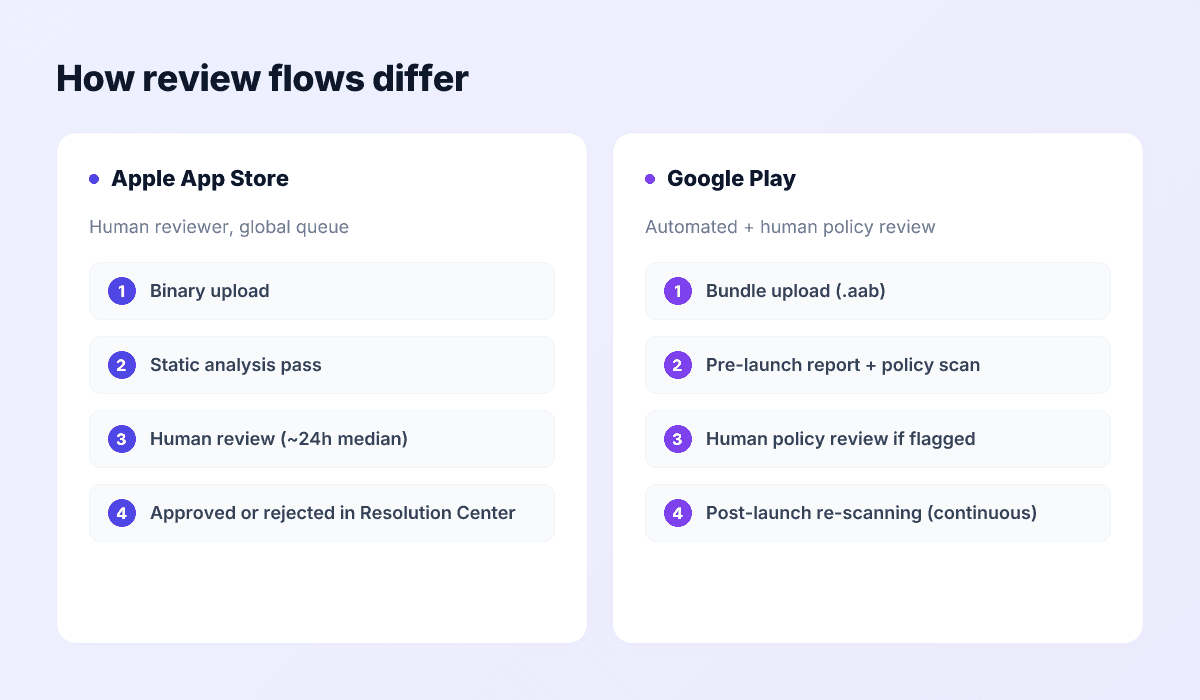
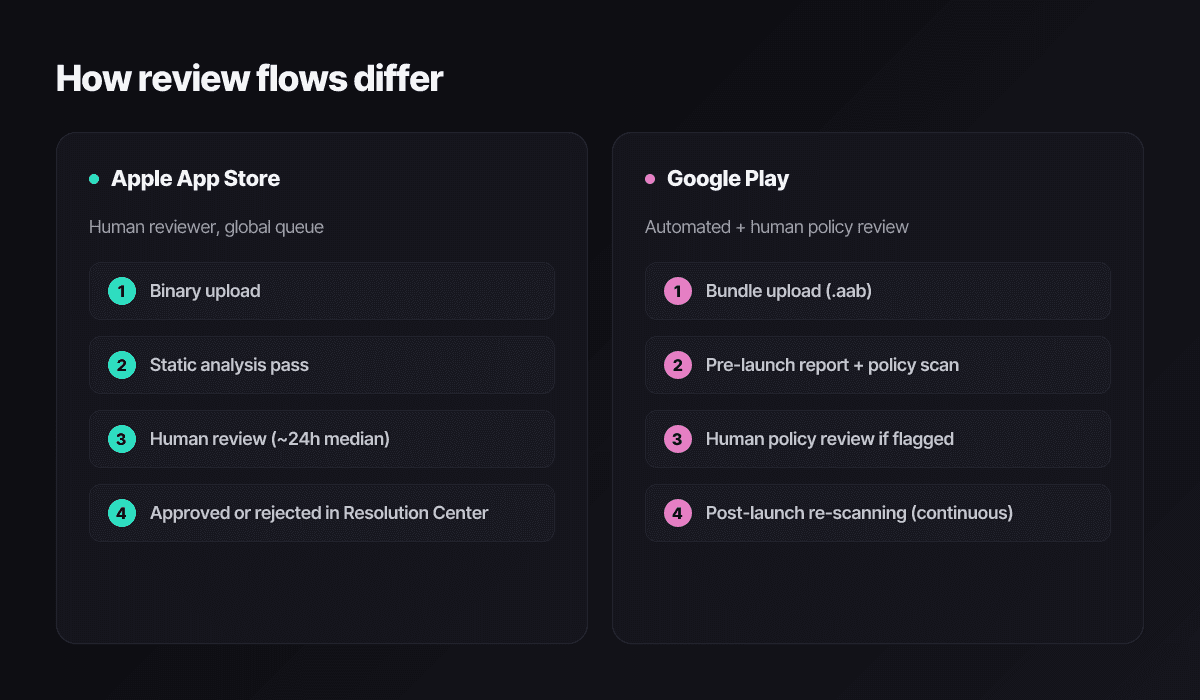
Neither store reads your code line by line. Apple pairs an automated static-analysis pass with a human reviewer who picks your app from a global queue, spends a few minutes on one device, tries the first advertised flow, and decides. Google leans harder on automation — a pre-launch report across real devices, a static policy scan, and human review where something gets flagged.
Apple’s flow. Most submissions are reviewed within about 24 hours, per Apple’s own published figures, with updates often faster and peak seasons slower. Rejections arrive as threaded letters in App Store Connect’s Resolution Center, with a guideline citation and usually a screenshot or crash log. The thread history for an app is permanent — which matters, because the reviewer reading your reply can see every previous exchange.
Google Play’s flow. New apps and new developer accounts get the slowest, most suspicious treatment — several days is normal, and personal accounts created after November 2023 must first clear the 12-tester closed-testing requirement before production access exists at all. Updates to established apps clear fast. The catch is post-launch: Play’s scanning continues against live apps forever, and a Data safety mismatch or a permissions policy change can suspend an app that passed review months earlier.
Why the same app passes one store and fails the other. Apple’s enforcement weight sits on completeness, design quality, business-model compliance, and metadata accuracy. Google’s sits on declarations and permissions: the Data safety form, restricted permissions like broad photo access, target API levels, and long-tail policies like Deceptive Behavior. Apple will reject a sparse template app as spam that Google would wave through; Google will pull an app over an undeclared analytics SDK that Apple never noticed. Treat them as two different exams with overlapping syllabi.
How to use this 80+ index
The index is grouped into seven categories plus a workflow:
- Metadata and listing — judged before your app is ever launched.
- Binary and platform — caught by automated passes on the artifact itself.
- Functionality and user-facing — what a human reviewer hits in the first five minutes.
- Privacy, data, and tracking — declarations that don’t match behavior.
- Design and content — quality, IP, and content judgment calls.
- Business model and payments — IAP, subscriptions, external purchases.
- Platform special cases — the traps waiting for developers crossing from one store to the other.
- Pre-flight and appeal — staying out of the index, and getting out once you’re in it.
Citations are App Review Guideline numbers (Apple) or Play policy names (Google). Primary sources: developer.apple.com/app-store/review/guidelines and the Play Developer Policy Center. Both changed materially in late 2025 — the November 13, 2025 guideline revision is reflected throughout this index.
Metadata and listing rejections
Metadata is judged first, costs nothing to fix, and still causes an outsized share of rejections. A reviewer reads your name, subtitle, and screenshots before launching anything; Apple also crawls every URL in the listing. The keyword character counter and subtitle helper exist for this section.
| Rejection signal | Why it happens | Fix | Rule |
|---|---|---|---|
| Generic, category-only app name (“Budget Tracker”, “PDF Scanner Pro”) | Reads as a search-ranking play rather than a brand. | Brand first, one descriptor after. Keep it under 30 characters. | Apple 4.1 |
| Competitor names or trademarks in metadata | Other apps’ brands in your keywords, subtitle, or description — including the hidden keywords field. | Strip every mark you don’t own or license. Apple reads the keywords field even though users can’t. | Apple 5.2 / Google IP |
| Subtitle promises a feature the reviewer can’t find | Subtitle written against the roadmap, not the build. | Describe the current first-run experience only. | Apple 2.3.7 |
| Prices or time-limited offers in promotional text | Promo text is product description, not a campaign banner. | Keep promotional text evergreen; put offers in-app. | Apple 2.3.1 |
| Screenshots show a different app, OS, or fabricated UI | Concept art, stale designs, or another platform’s chrome. | Re-render from the shipping build at current sizes — the 2026 size reference has every dimension. | Apple 2.3.3 |
| Support URL is a 404, a parked domain, or a social profile | Apple requests every listing URL during review. | A real support page with a visible contact path. | Apple 1.5 |
| Placeholder copy anywhere in the listing | “Lorem ipsum” or template text in a localized description you forgot existed. | Grep every locale’s fields for placeholder strings before submitting. | Apple 2.3 |
| Third-party IP in icon, screenshots, or copy | Characters, logos, celebrity likenesses, league marks without a license. | Remove, or have the license document ready to attach to your reply. | Apple 5.2 / Google IP |
| Machine-translated listing locales | A reviewer (or user report) in that market flags gibberish metadata. | Localize for real — Push My App’s 14-language localization regenerates metadata per locale instead of word-swapping it. | Apple 2.3 / Google Metadata |
| Feature graphic with device frames or CTA text (Google) | Play bans both in the 1024×500 graphic specifically. | Logo, tagline, clean background. Nothing else. | Google Metadata |
| Icon or name imitates another developer’s app | The November 2025 guidelines added explicit copycat language: another developer’s icon, brand, or product name requires their approval. | Redesign for unmistakable distance; keep evidence of your prior art. | Apple 4.1 (Nov 2025) / Google Impersonation |
| Near-duplicate listings across one account (Google) | Several reskins of the same app on one developer account. | Consolidate, or differentiate content and function meaningfully. | Google Spam & Min Functionality |
| “Beta”, “trial”, or “test” wording in a production listing | Public App Store listings can’t describe an unfinished product. | Beta distribution belongs in TestFlight or Play’s testing tracks. | Apple 2.2 |
| Age rating questionnaire stale after the 2025 overhaul | Apple replaced 12+/17+ with 13+/16+/18+ tiers and added questions on in-app controls, wellness topics, and AI chatbot exposure. Apps that missed the January 31, 2026 deadline can’t submit updates. | Complete the updated questionnaire in App Information, then re-check the resulting rating matches your content. | Apple 1.3 / ASC requirement |
| Age rating doesn’t match actual content | UGC, dating, gambling-adjacent, or AI-generated content rated 4+. | Re-answer honestly; add moderation if the content warrants it. | Apple 1.3 / Google Content Rating |
| Missing trader status for EU storefronts | The Digital Services Act requires a verified trader declaration; Apple removed non-compliant apps from EU storefronts starting February 2025. | Submit trader contact details in App Store Connect and verify them. | EU DSA / ASC requirement |
Binary and platform rejections
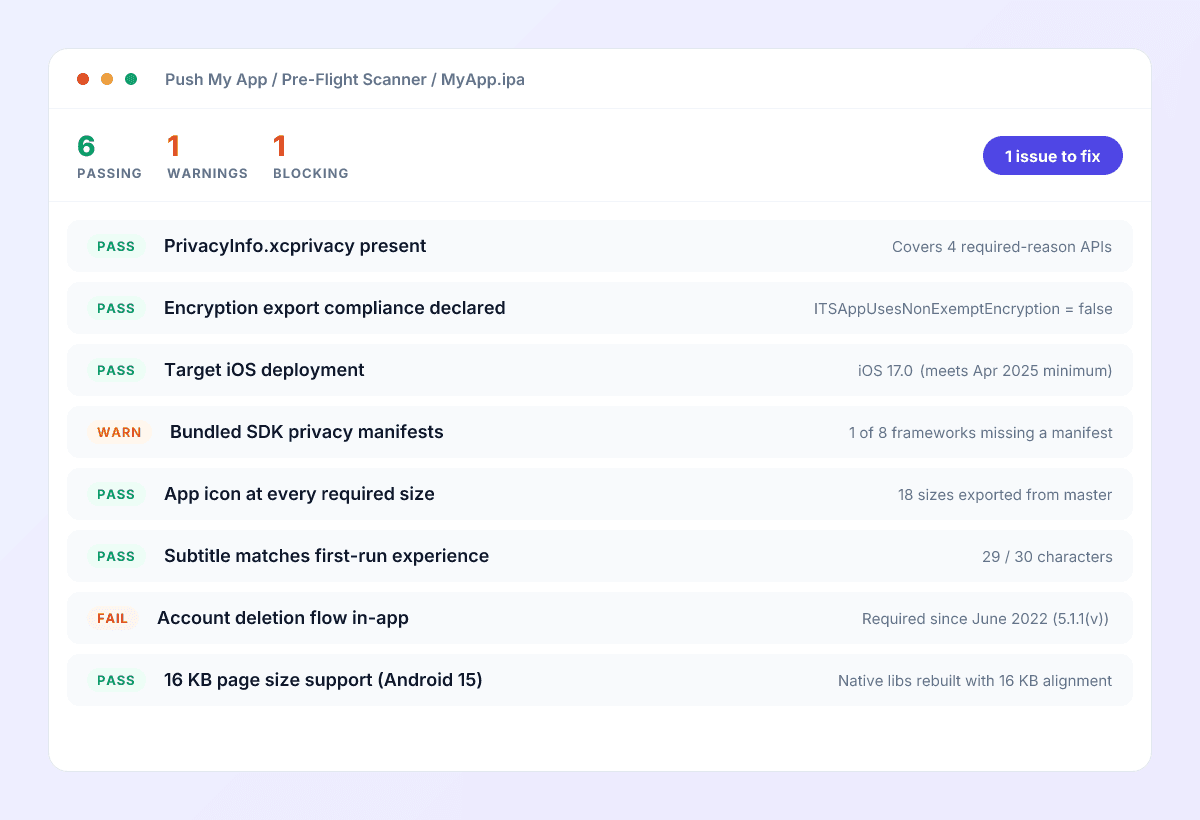
Everything in this table is mechanically detectable before you submit, which is exactly what the Pre-Flight Scanner does against your .ipa, .apk, or .aab — down to the file or manifest key that would trip the automated pass.
| Rejection signal | Why it happens | Fix | Rule |
|---|---|---|---|
| Crash on launch on the review device | The single most common rejection. The letter names the device model and OS build. | Reproduce on exactly that configuration; attach the fix evidence to your reply. | Apple 2.1 |
| Built with an SDK older than iOS 26 | Since April 28, 2026, App Store Connect refuses uploads not built with Xcode 26 and the platform 26 SDKs. | Update Xcode, rebuild, re-test. Deployment target can stay old; the build SDK cannot. | Apple upload requirement (Apr 2026) |
| Missing Privacy Manifest for required-reason APIs | UserDefaults, file-timestamp, disk-space, boot-time, or keyboard APIs used without declared reason codes. Arrives as ITMS-91053. | Add PrivacyInfo.xcprivacy with approved reason codes; audit every target. | Apple 5.1.1 |
| Bundled SDK lacks its own Privacy Manifest | The violation is inside a dependency — the letter (ITMS-91061) names the framework. | Update the SDK; if it’s unmaintained, vendor a manifest or drop it. | Apple 5.1.1 |
| Encryption export compliance undeclared | ITSAppUsesNonExemptEncryption missing, so every submission asks again — or answers wrong. | Set the key in Info.plist (false for standard HTTPS); file the self-classification report if not exempt. | US EAR / Apple 5.1 |
| Private API usage in the binary | Static analysis finds a private selector — often inherited from an outdated SDK. | Remove the call or update the dependency that makes it. | Apple 2.5.1 |
| Required device capability the hardware lacks | UIRequiredDeviceCapabilities promises something the review device doesn’t have. | Drop the capability and gate the feature at runtime instead. | Apple 2.1 |
| Target API level below 35 (Google) | Play’s rolling floor: API 35 now, API 36 for new apps and updates from August 31, 2026. | Bump targetSdkVersion early and re-test permissions, storage, and foreground services. | Google Target API Level |
| Native libraries without 16 KB page support (Google) | Required since November 2025 for apps targeting Android 15+ that ship .so files. | Rebuild native dependencies with 16 KB alignment; verify in the App Bundle analyzer. | Google 16 KB requirement |
| Debuggable or test configuration in a release build (Google) | android:debuggable="true" or cleartext HTTP allowed in the release manifest. | Audit release Gradle variants; disable debuggable and usesCleartextTraffic. | Google Security |
| Missing 64-bit support (Google) | Bundle lacks arm64-v8a. | Ship an AAB containing 64-bit ABIs — Play has required this for years. | Google 64-bit |
| Wrong artifact format | An APK aimed at App Store Connect, or an APK to Play for a new app (AAB-only since 2021). | iOS ships .ipa via Xcode archive; Play ships .aab. The format guide covers the whole decision. | Store upload requirements |
| Orphaned entitlements | HealthKit, Push, or Wallet entitlements declared but unused — privacy review flags the mismatch. | Remove every entitlement the app doesn’t exercise. | Apple 5.1.3 / 2.5.4 |
If the letter says ITMS-91053, 91056, or 91061
Functionality and user-facing rejections
Now the reviewer is inside your app. Everything here is about the first session: can they reach the core flow, does it work, and does it match what the listing promised.
| Rejection signal | Why it happens | Fix | Rule |
|---|---|---|---|
| Minimum functionality / template app | Thin content, a reskin, or a wrapper that doesn’t justify being an app. | Ship real differentiated content before submitting — depth beats breadth. | Apple 4.2 / 4.3 |
| Demo account doesn’t work | Credentials expired, 2FA blocks the reviewer, or the account points at staging. | Test the exact credentials from App Review notes on a clean install the night before. | Apple 2.1 |
| Sign-up required before anything is usable | Reviewer can’t evaluate without creating an account; users can’t browse. | Guest mode for non-account features, or registration only when a feature truly needs it. | Apple 5.1.1(v) |
| No in-app account deletion | Apps with account creation must offer full in-app deletion — not a mailto link. | A Delete Account flow that actually deletes, with confirmation. | Apple 5.1.1(v) |
| Account deletion web link missing from Data safety (Google) | Play also requires a web URL where users can request deletion without reinstalling — rejections cite an invalid or missing link. | Publish a web deletion page and reference it in the Data safety form’s deletion questions. | Google User Data |
| Social-only login without a privacy-preserving option | App offers only Google/Facebook-style logins. | Add a login option with Apple’s required privacy properties — Sign in with Apple is the canonical way to satisfy it. | Apple 4.8 |
| WebView wrapper of a website | A native shell around a URL with no platform integration. | Add genuinely native value — offline, push, widgets, share extensions — or stay a website. | Apple 4.2 |
| Digital content sold outside IAP | Unlocks, credits, or subscriptions for in-app digital goods routed around StoreKit without an entitlement. | Route through IAP, or qualify for an external-purchase path (regional rules below). | Apple 3.1.1 |
| Mini apps and HTML5 games outside the rules | The November 2025 update made explicit that embedded HTML5/JS mini apps are in scope — each must meet content and payment rules. | Apply the same review standards to embedded content as to the host app; gate and moderate the catalog. | Apple 4.7 (Nov 2025) |
| TestFlight or beta links in the production build | Production app advertises or links to a beta channel. | Strip beta references from release builds and listings. | Apple 2.2 |
| Regulated content without the license (Google) | Gambling, lending, pharma, or alcohol content without the regional permit uploaded. | Hold the license first; attach documentation in Play Console before submission. | Google Restricted Content |
| UGC without moderation infrastructure | User content with no report, block, or takedown mechanism. | All four or nothing: filtering, reporting, blocking, and a responsive takedown process. | Apple 1.2 / Google UGC |
| Generative AI output with no moderation layer | Raw LLM or image-model output exposed directly to users. | Moderate before display, publish a content policy, rate-limit, and handle the age rating questionnaire’s AI questions honestly. | Apple 1.1 / Google AI-Generated Content |
| Fake system UI or alarmist prompts | Screens that imitate iOS settings, fake virus warnings, fake update dialogs. | Make your UI unmistakably yours; alarmist patterns are also an ads-policy violation on Play. | Apple 2.3.1 / Google Deceptive Behavior |
Privacy, data, and tracking rejections
Privacy is where enforcement has tightened hardest since 2024, and where the two stores diverge most. Apple triangulates between three artifacts — the App Privacy label, the Privacy Manifest, and runtime behavior — and rejects on any disagreement. Google audits the Data safety form against observed traffic and now gates entire permission groups behind declarations. The data collection itself is rarely the problem; the mismatch is.
| Rejection signal | Why it happens | Fix | Rule |
|---|---|---|---|
| Privacy policy URL broken or not a policy | 404, parked domain, or a marketing homepage where a policy should be. | A real, current policy at a stable URL, linked directly. | Apple 5.1.1 / Google User Data |
| Privacy label contradicts the manifest or behavior | Label says “Data Not Collected” while an SDK ships analytics. | Reconcile all three: label, manifest, and actual network traffic. | Apple 5.1.1 / 5.1.2 |
| Personal data shared with third-party AI without consent | New in the November 2025 guidelines: passing user data to an external AI provider requires disclosure and explicit permission. | Add a consent step before any LLM/AI call that includes personal data; name the provider in your privacy policy. | Apple 5.1.2(i) (Nov 2025) |
| Cold ATT prompt with no context | The tracking dialog fires on first launch with no explanation. | Pre-prompt screen with a factual reason, then the system dialog. | Apple 5.1.2 |
| Tracking continues after ATT denial | IDFA or fingerprinting-adjacent reads despite a declined prompt. | Gate every identifier read on authorization status — required-reason APIs make fingerprinting detectable. | Apple 5.1.2 |
| Data safety form mismatch (Google) | Form says nothing is collected; the app transmits device IDs, location, or crash logs tied to users. | Audit every SDK’s traffic and declare it all — analytics and crash reporting included. | Google Data Safety |
| Broad photo/video permission without approval (Google) | READ_MEDIA_IMAGES/VIDEO now requires an approved declaration; full enforcement since May 2025. | Switch to the system photo picker for occasional access, or pass the broad-access review with a core use case. | Google Photo & Video Permissions |
| Fine location without a fine-location feature | ACCESS_FINE_LOCATION requested where coarse would do. | Downgrade the permission or document the feature that genuinely needs precision. | Google Location |
| Background location, period | The highest-scrutiny permission on both stores; unclear justification is an automatic flag. | Remove it unless the user-visible feature is impossible without it — then document exhaustively. | Google Background Location / Apple 5.1.1 |
| Kids/Families app with non-compliant SDKs | Child-directed app embeds general-purpose ads or analytics SDKs. | Only Families-self-certified SDKs, or none. | Apple 1.3 / Google Families |
| No consent flow where COPPA/GDPR requires one | Data collected from minors or EU users without verifiable consent. | Region-aware consent gating, with records. | Regulation / both stores |
| SDK exfiltrates data you never declared | An attribution or “growth” SDK reads contacts, clipboard, or installed packages. | Read your SDKs’ data practices before review does; drop the ones that won’t pass. | Apple 5.1.1 / Google User Data |
Make the declarations the source of truth
Design and content rejections
The most subjective category — two reviewers can disagree about the same build. You can’t control the reviewer; you can control every objective signal they use to form the judgment: icon, screenshots, onboarding, empty states, and the paywall.
| Rejection signal | Why it happens | Fix | Rule |
|---|---|---|---|
| Copycat branding | Icon, name, or look traded on a well-known app — explicitly banned without the other developer’s approval since November 2025. | Rebrand with distance; document your originality for the reply. | Apple 4.1 / Google Impersonation |
| Beta-quality experience in production | Unfinished flows, dead buttons, obvious WIP. | That build belongs in TestFlight or a Play testing track, not review. | Apple 2.2 / Google Quality |
| Placeholder assets and default templates | Gray boxes, default launch screens, lorem-ipsum empty states. | A final screen-by-screen sweep before archive. | Apple 4.0 |
| Listing icon differs from the installed icon | Two generations of branding shipped simultaneously. | Re-export everything from one master — the icon resizer generates every size from one 1024×1024. | Apple 2.3.3 |
| Marketing push notifications without opt-in | Promotional pushes sent without a separate, declinable consent. | Split transactional from marketing notifications; opt-in for the latter. | Apple 4.5.4 |
| Dark-pattern paywall | Hidden price, pre-selected longest plan, invisible close button, buried cancel path. | Price, period, renewal terms, and a working close button — visible before purchase. | Apple 3.1.2 / Google Subscriptions |
| Content exceeds the age rating | Violence, sexual themes, or gambling mechanics above the declared tier — scrutiny is higher under the new 13+/16+/18+ system. | Raise the rating or gate the content. | Apple 1.1 / Google Content Rating |
| Creator app without age-restriction controls | Also new in November 2025: creator platforms must let users flag content exceeding the app’s rating and restrict underage access. | Add age-based access controls tied to declared or verified age. | Apple 1.2 (Nov 2025) |
| AI content resembling real people | Deepfake-adjacent generation of identifiable individuals without consent. | Block named-person prompts; watermark and moderate output. | Apple 1.1 |
| Misleading store listing (Google) | Screenshots or description promise functionality the build lacks. | Re-align every asset with the shipped experience. | Google Deceptive Behavior |
| Default empty states everywhere | Blank lists with no copy read as unfinished to reviewers. | One instructive sentence per empty state minimum. | Apple 4.0 |
| Broken dark mode | Illegible text or inverted assets in dark appearance. | Audit every screen in both appearances before submitting. | Apple 4.0 / Google Quality |
Business-model and payments rejections
Narrow category, expensive mistakes. The payments landscape also changed more in 2025 than in the previous five years — US external purchase links, the EU’s single business model, and new lending rules all landed within twelve months.
| Rejection signal | Why it happens | Fix | Rule |
|---|---|---|---|
| Subscription terms not visible at purchase | Price, billing period, or auto-renewal absent from the paywall. | All of it, above the fold, before the Subscribe tap. | Apple 3.1.2(a) |
| Trial-to-paid conversion undisclosed | Users discover the renewal charge from a receipt email. | “After the trial, billed $X every month” next to the CTA, not in fine print. | Apple 3.1.2(a) / Google Subscriptions |
| Physical goods sold through IAP | StoreKit used for shipped products or real-world services. | Physical commerce uses normal payment processing — Apple Pay or a card processor. | Apple 3.1.5(a) |
| External purchase link with wrong execution | US storefront links are permitted following the 2025 Epic v. Apple injunction, and EU links under DMA terms — but each region has disclosure-sheet and formatting requirements that most apps get wrong. | Follow the current StoreKit External Purchase Link documentation for each storefront; don’t reuse one region’s flow in another. | Apple 3.1.1(a) / 3.1.3 |
| Recurring digital subscriptions outside Play Billing | Stripe checkout for in-app digital subscriptions on Android. | Play Billing for digital goods, with the same regional exceptions logic as Apple. | Google Payments |
| No Restore Purchases path | Reinstalls and new devices can’t recover entitlements. | Restore button on the paywall and in settings. | Apple 3.1.1 |
| Loan app over the APR cap | November 2025 added hard limits: max 36% APR including fees, and no full repayment demanded in 60 days or less. | Restructure terms or exit the category — this one is binary. | Apple 3.2.1 (Nov 2025) / Google Financial Services |
| Real-money gambling without regional licensing | Permitted only in licensed regions with documentation on file. | License first, geofence strictly, submit documents with the build. | Google Gambling / Apple 5.3 |
| Sneaky commission avoidance | Discounting web prices in-app, nagging users to “pay on our site”, or hiding IAP from review builds. | Whatever the entitlement situation, misrepresenting the purchase flow to review is the fastest route to repeated rejections. | Apple 3.1.1 / 2.3.1 |
Android-only and iOS-only special cases
The traps that catch developers crossing from one platform to the other — usually invisible until the first cross-platform release.
| Rejection signal | Why it happens | Fix | Rule |
|---|---|---|---|
| iOS: system glyphs as the app icon | SF Symbols or Apple marks used as primary icon art. | Original artwork only — see the icon design guide. | Apple 4.1 / HIG |
| iOS: missing Liquid Glass icon variants | iOS 26’s appearance modes (dark, clear, tinted) render legacy icons poorly; premium categories get flagged on quality. | Build the layered icon in Icon Composer and ship all appearance variants. | Apple HIG (iOS 26) |
| iOS: Wallet passes with broken signing | Pass Type ID or certificate not configured for the distribution build. | Register the Pass Type ID and embed the production certificate. | Apple Wallet |
| iOS: stale screenshots after a UI overhaul | Cross-platform teams update Android assets and forget App Store Connect. | Tie both stores’ asset refresh to one release checklist. | Apple 2.3.3 |
| Android: notifications without POST_NOTIFICATIONS | Runtime permission required since API 33; silent failure looks like a broken feature. | Request in context before the first notification; degrade gracefully. | Android 13+ |
| Android: SCHEDULE_EXACT_ALARM without a qualifying case | Exact alarms are reserved for alarm/timer-class features. | Use inexact scheduling, or declare the qualifying use case in Play Console. | Google Exact Alarms |
| Android: foreground service without a declared type | Android 14+ requires foregroundServiceType per service, with matching permissions. | Declare types in the manifest; request the paired runtime permissions. | Android 14+ |
| Android: QUERY_ALL_PACKAGES without approval | Broad package visibility is approval-gated for a short list of app types. | Use targeted <queries> entries instead. | Google Package Visibility |
| Android: app links that fail verification | autoVerify intents with a missing or wrong assetlinks.json. | Publish .well-known/assetlinks.json with the release-signing SHA-256 — remember Play App Signing changes the fingerprint. | Android App Links |
| Android: edge-to-edge regressions on Android 16 | Apps targeting API 36 can no longer opt out of edge-to-edge; broken insets read as a quality failure in pre-launch reports. | Adopt WindowInsets handling before the API 36 deadline forces it. | Android 16 behavior change |
A pre-flight workflow that keeps you out of the index
Twenty minutes the night before submission catches most of this page:
- Scan the binary. The Pre-Flight Scanner runs the Binary and Privacy sections automatically — manifests, SDK targets, 16 KB alignment, debug flags, entitlements, permission scope — and names the offending file.
- Scan the metadata. Every localized field within limits (keyword character counter), subtitle describing the shipped build (subtitle helper), no placeholder strings in any locale.
- Regenerate assets from masters. One icon master, one screenshot master per device class, re-exported together so nothing drifts — sizes per the 2026 screenshot reference.
- Write the reviewer notes. Working demo credentials including 2FA, the one-paragraph core-flow description, special configuration, and a test card if there’s IAP. Half of all 2.1 rejections are really reviewer-notes failures.
- Stage the reply template. If a letter comes, replying within the hour with evidence beats replying tomorrow with prose.
Run your next build through an 80+ rejection pre-flight
Push My App’s Pre-Flight Scanner runs the full mechanical index — binary, privacy, metadata, and asset checks — against your .ipa, .apk, or .aab before you hit Submit, and direct submission ships the approved build to both stores from one dashboard.
What to do if you are already rejected
Read the letter twice and list every citation. Letters frequently cite two or three guidelines; fixing one and resubmitting earns you a second rejection for the ones you skipped, plus a slower queue position as a repeat submitter.
Reply with evidence, not essays. The person reading your Resolution Center reply wants the shortest defensible path to approving you. Screenshots, screen recordings, a diff, a license PDF — attach the artifact that proves the fix and keep the prose to a few lines.
Spend expedited reviews like the scarce currency they are. Apple grants them for genuine user-facing emergencies. Burn one on a missed marketing date and the next request gets quietly ignored.
Appeal only what is actually wrong. Apple’s App Review Board and Play’s policy appeals exist for reviewer error you can demonstrate — not for disagreements about judgment calls. For everything else, the edit-and-resubmit loop is faster. If you want a sanity check on whether your flow is standard, compare against how ASO.dev handles the same flow — and if you’re stuck, the contact form reaches a human who has read a lot of rejection letters.
Frequently asked questions
What is the number one reason apps get rejected from the App Store in 2026?
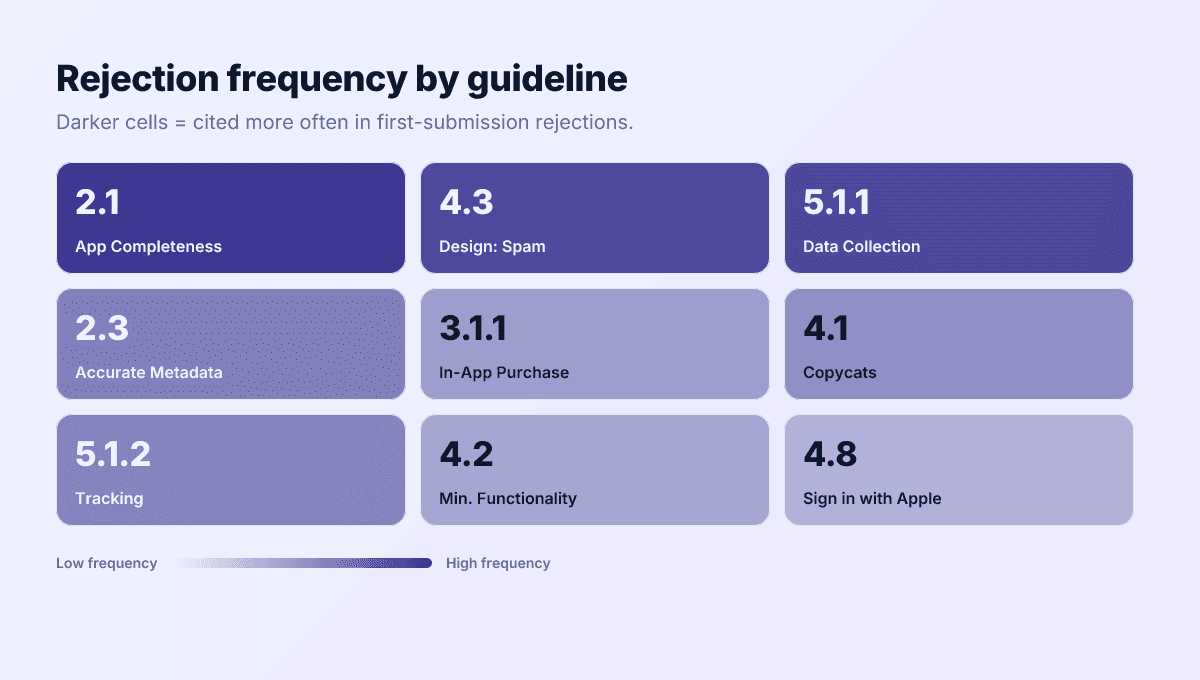
Still Guideline 2.1, App Completeness. A crash on the reviewer's device, a demo account that doesn't work, or a core feature that can't be reached in the first few minutes accounts for more rejections than any policy issue. Reviewers spend minutes, not hours — anything that blocks the happy path in that window is an automatic reject.
How long does App Store review take in 2026?
Apple's long-standing figure is that the large majority of submissions are reviewed within 24 hours, and updates often clear faster. Expect two to three days during crunch windows like late November through December. Google Play takes longer for new apps and new developer accounts — several days to a week is normal — while updates to established apps usually clear within a day.
Can Apple or Google reject my app after it is already live?
Yes, both. Apple re-applies new rules at your next update and occasionally removes live apps for serious violations — and EU storefront listings were removed in 2025 for missing trader status under the DSA. Google is more aggressive: automated post-launch scans suspend live apps for policy violations with an appeal process measured in days. Treat review as continuous, not a one-time gate.
What changed most recently in the App Review Guidelines?
The November 13, 2025 revision was the biggest in years: apps must now disclose and get permission before sharing personal data with third-party AI, copycat protections were strengthened so you cannot use another developer's icon, brand, or product name without approval, loan apps got a 36% APR cap, and HTML5/JavaScript mini apps were explicitly pulled into scope. Separately, since April 28, 2026 every upload must be built with Xcode 26 and the iOS 26 SDK.
Does using AI-generated content increase my rejection odds?
It adds review surface. Apple requires moderation for generative output, rejects deepfake-style content resembling real people, and — since November 2025 — requires explicit user permission before personal data is shared with a third-party AI provider. Google flags unmoderated generative output under Deceptive Behavior and its AI-Generated Content policy. If your app calls an LLM or image model, ship a visible moderation and consent layer.
Can Push My App's Pre-Flight Scanner catch every rejection reason?
No — and nothing can. The Scanner catches what is detectable from the binary, metadata, and assets: missing Privacy Manifests, stale target SDKs, 16 KB alignment, over-broad permissions, metadata limit violations, asset mismatches. Rejections that depend on a reviewer using the app — a dead demo login, a thin feature set read as spam — still require your judgment. See the pricing page for what each plan includes.
Ship your listing without the rejection letter
Push My App generates store-ready metadata, resizes screenshots for every device, translates your listing into 14 languages, and runs an 80+ item rejection pre-flight before you submit.
Get Started FreeKeep reading
App Store Rejections
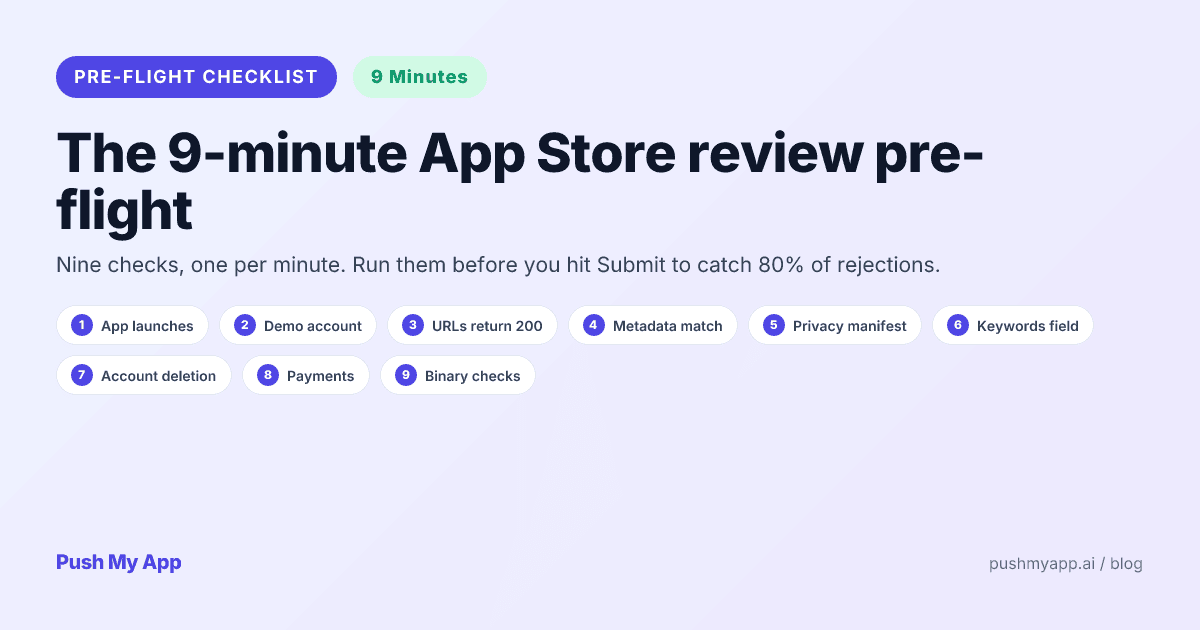
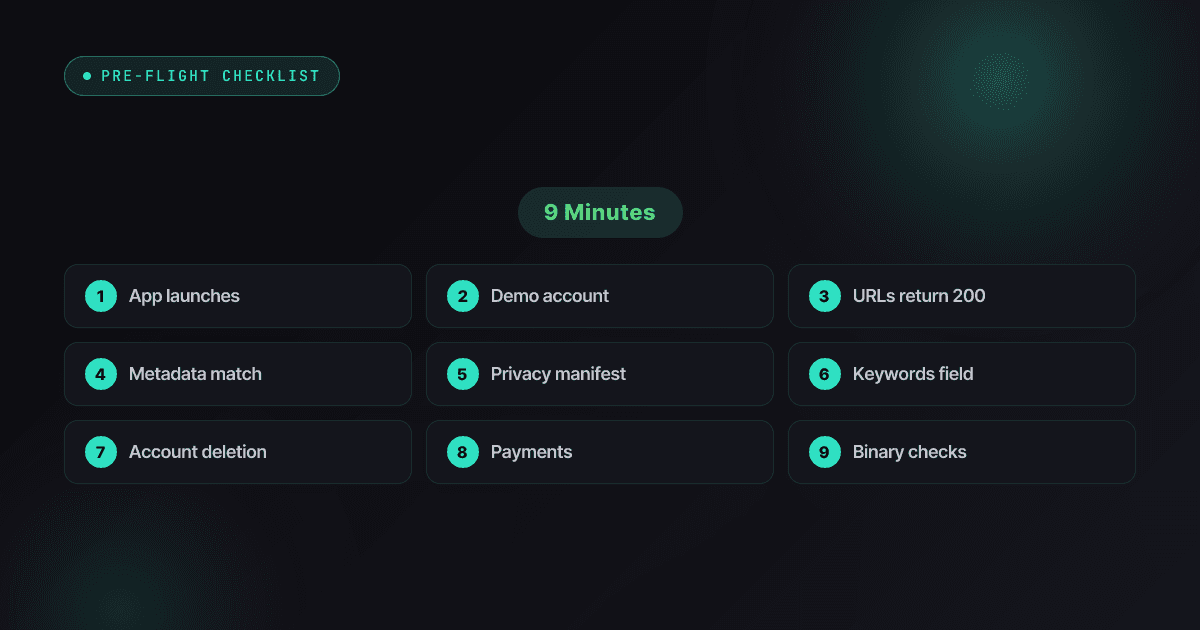
App Store Review Pre-Flight: A 9-Minute Checklist Before You Hit Submit
Nine one-minute checks that catch most App Store and Google Play rejections before reviewers do — updated for the Xcode 26 mandate, age-rating gates, and 2026 compliance fields.
Read
App Store Rejections
Your App Got Pulled: A 2026 Recovery Playbook
A live-app removal survival guide — first-24-hours triage, removal vs strike vs termination, reply templates for the six common pull types, appeals on both stores, and the ranking recovery curve.
Read

ASO Guides
Apple Search Ads for Indie Developers: When It's Worth It (and When It Isn't)
Apple Search Ads is now Apple Ads, with four placements and the same indie question: is it worth your money yet? The readiness gate, real learning costs, and the five keywords worth bidding on.
Read