
ASO Guides
Apple Search Ads for Indie Developers: When It's Worth It (and When It Isn't)
Apple Search Ads is now Apple Ads, with four placements and the same indie question: is it worth your money yet? The readiness gate, real learning costs, and the five keywords worth bidding on.
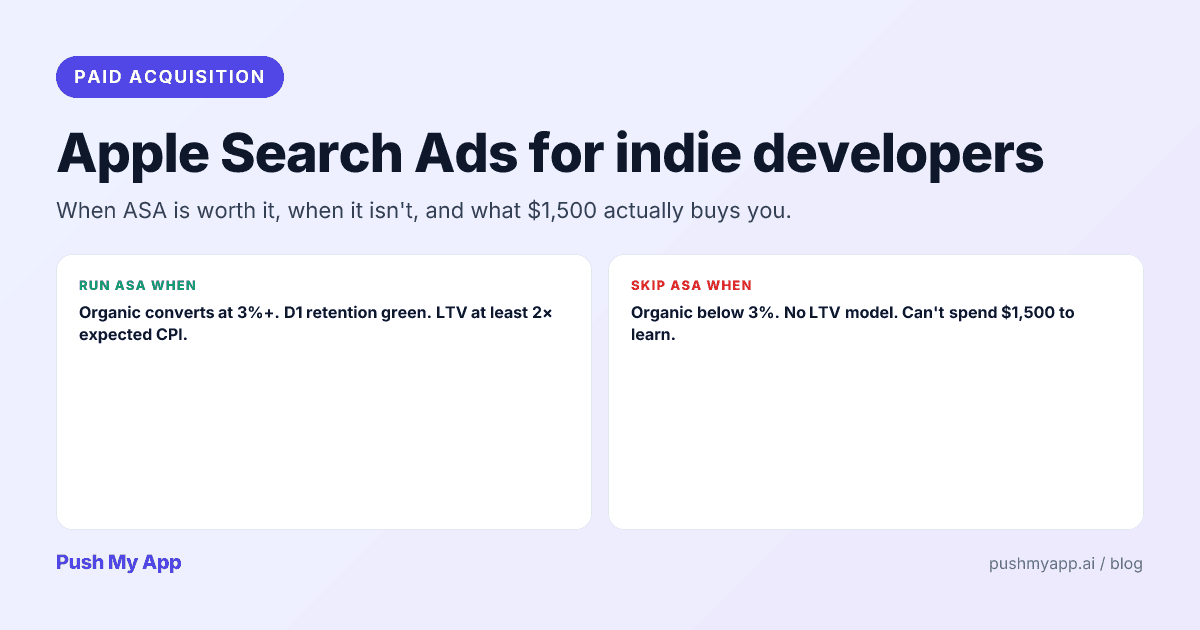

Somewhere between “never touch paid” and “just run ads, bro” is the actual indie answer to Apple Search Ads — and it’s a gate, not an opinion. Run it before your funnel is ready and you pay to amplify a page that doesn’t convert. Refuse it forever and you leave the only in-store, intent-matched channel unused while competitors bid on your brand name.
This is the indie framework for the channel as it exists in 2026 — renamed, expanded, and still ruled by the same math: what the platform actually is now, the three checks that say you’re ready, what learning genuinely costs, and the small set of keywords where indie money works.
Prerequisites live elsewhere on this blog: the ASO playbook for the organic funnel and the keyword research playbook for the terms you’ll eventually bid on.
What Apple Ads actually is in 2026
The platform formerly named Apple Search Ads became Apple Ads in April 2025, because “search” stopped describing it: placements now cover search results (the classic sponsored slot above organic), the Search tab (before a query is typed), the Today tab, and product pages (the “You Might Also Like” rail) — with Apple signaling more inventory through 2026.
For indies, that expansion is mostly noise. The placement that earns its cost is still search results, for one reason: the user typed their intent two seconds ago. That’s why search-results taps convert to installs at rates no display surface approaches — and why everything in this post assumes you’re buying search placements and ignoring the rest until the search math works.
Mechanics worth knowing: you pay per tap, not per install; attribution flows through Apple’s ads attribution API into your analytics; and ad eligibility rides your existing listing — your screenshots and metadata are the creative, with custom product pages available as per-ad-group landing pages.
Basic vs Advanced
Basic is a spend cap with a CPI goal; Apple picks keywords, places ads, and tells you very little. No keyword report, no negatives, no creative control. As a hands-off trickle of incremental installs it functions; as a learning system it’s a sealed box.
Advanced is the real product: per-keyword bids, exact and broad match, negative keywords, custom product pages per ad group, scheduling, and the reporting that makes iteration possible. It also hands you one free gift before you spend anything — a campaign draft exposes Apple’s keyword suggestions and the 5–100 popularity score, the only first-party search-volume signal that exists, which the research playbook uses as a free data source.
The decision in one line
The readiness gate — are you ready to spend?
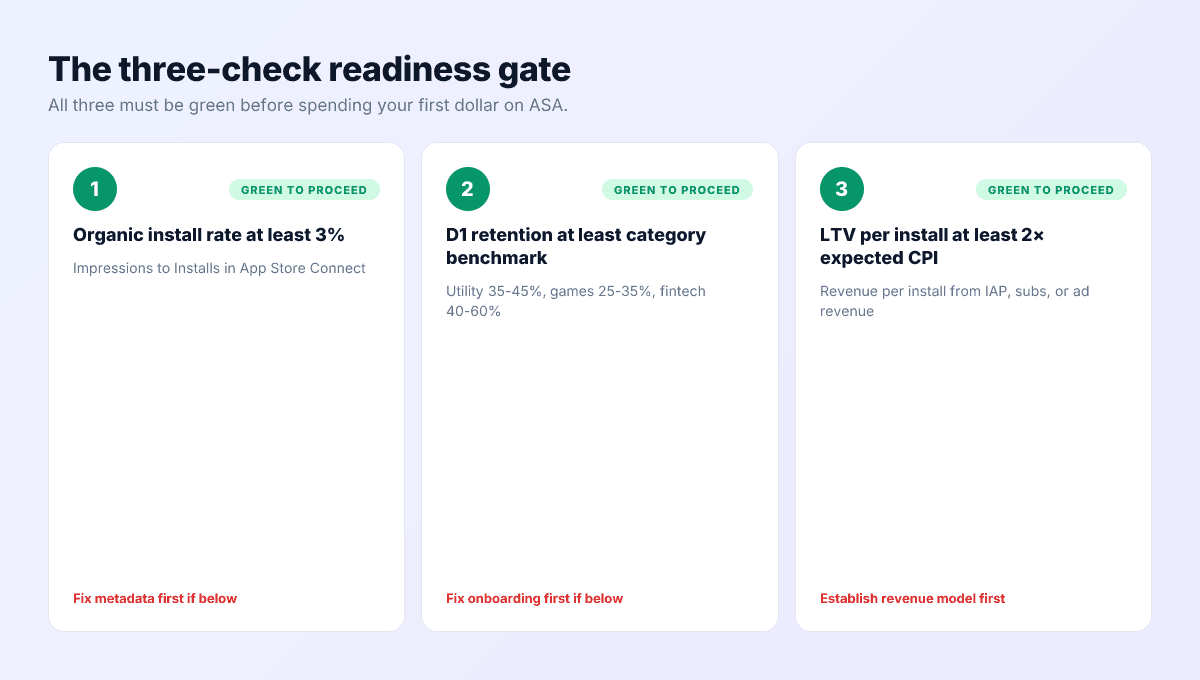
Three checks, all green before the first dollar. Paid acquisition multiplies whatever the funnel already does — including the broken parts.
Check 1 — the page converts organically
Read page-view-to-install conversion in App Store Connect. If visitors who arrive free don’t install at a healthy rate for your category, paid visitors won’t either — you’d be renting traffic for a page that leaks. Fix screenshots and metadata first; that work is free and compounds.
Check 2 — users who install, stay
Day-1 retention at or above your category’s norm. Paid installs churn at least as hard as organic ones, and churned paid installs are pure loss — plus they feed the engagement signals that organic ranking reads. Broken onboarding turns ad spend into an organic-rank tax.
Check 3 — an install is worth something
Know your revenue per install over the first 60–90 days, and require comfortable headroom over your expected cost per install — twice the CPI is the working indie floor. At thinner margins, ordinary measurement noise eats the business case; with no revenue model at all, there is no business case to eat.
What it actually costs to learn
The number nobody puts in the launch thread: reaching a defensible verdict on whether the channel works for your app costs four figures over one to two months. Per-keyword conclusions need enough taps per keyword, and taps cost real money — drip $50 a week across ten keywords and you’ll still be guessing at Christmas.
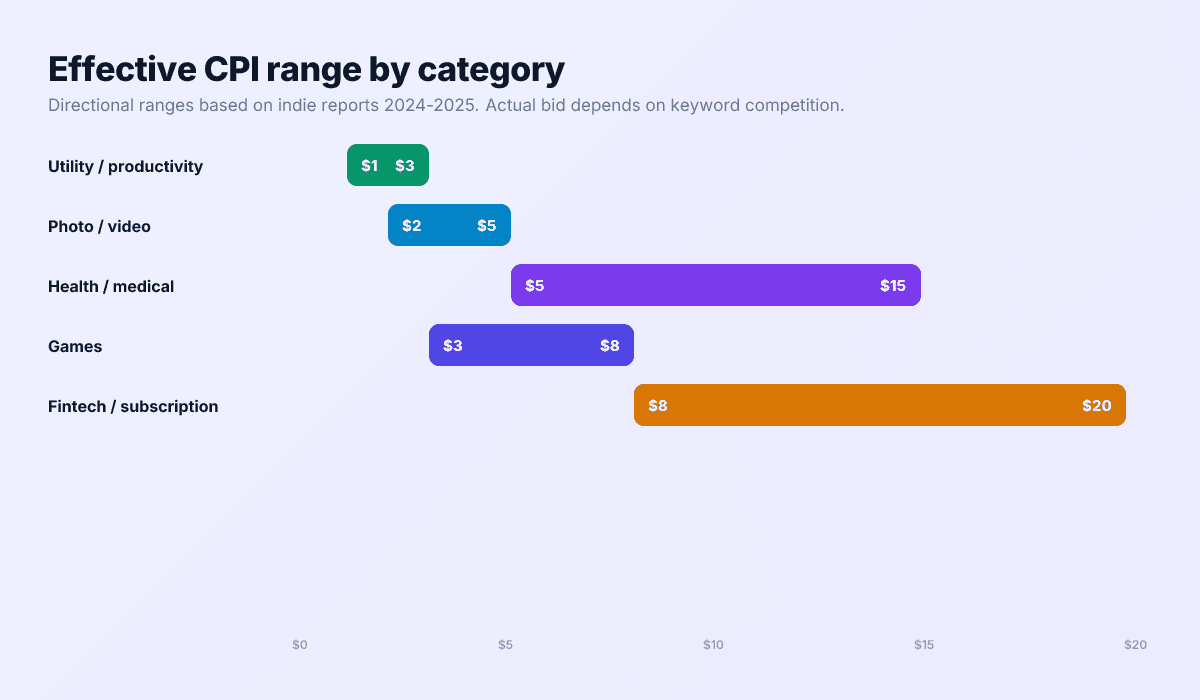
Directional economics by category
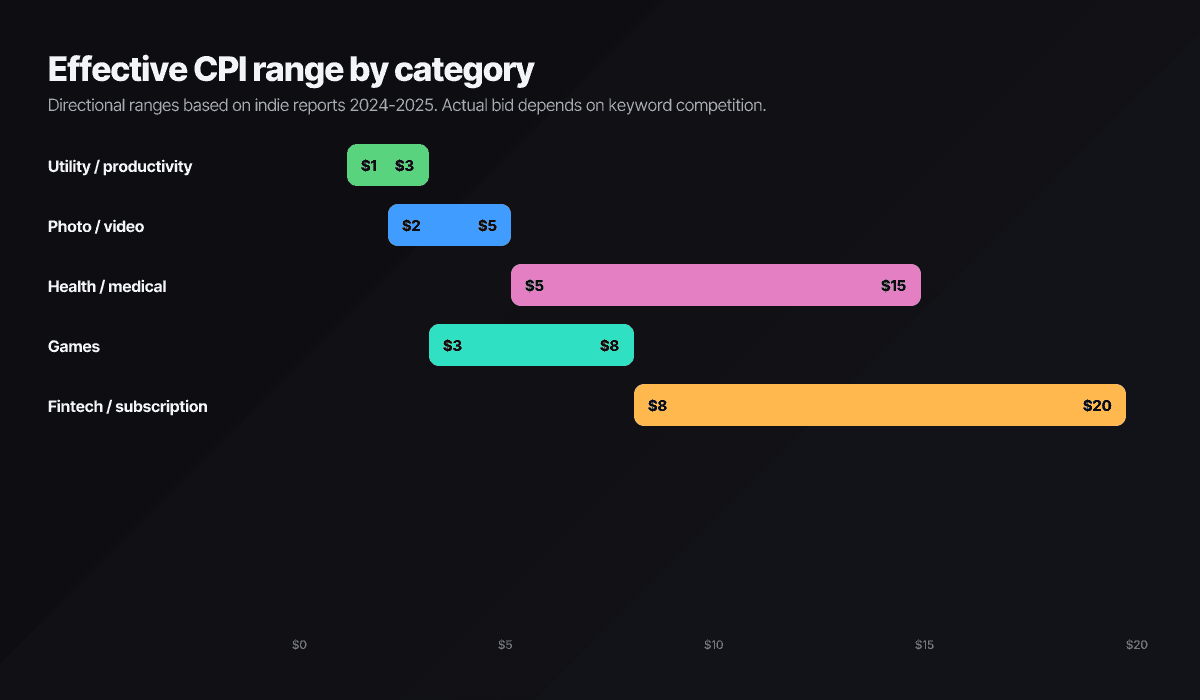
| Category | Cost per tap | Effective CPI |
|---|---|---|
| Utility / productivity | $0.50–$1.50 | $1–$3 |
| Photo / video | $1–$2.50 | $2–$5 |
| Games | $1–$3 | $3–$8 |
| Health / wellness | $2–$6 | $5–$15 |
| Fintech / subscription | $3–$8 | $8–$20+ |
Taps convert to installs at high rates by ad-industry standards — these are in-store users mid-search — which is why the per-tap price looks deceptively small and why the CPI, not the tap, is the number to budget against. Run the readiness-gate math on the CPI column for your category before anything else.
Does paid improve organic ranking?
Directly, no — Apple scores ads and organic independently, and always has. Indirectly, paid installs feed the same behavioral signals organic ranking weighs: retention, engagement, ratings. Buy users who genuinely wanted the app and the indirect effect is mildly positive. Buy broad-match strangers who churn on contact and you are paying to lower your own retention curves — the rare trick that costs money twice.
That asymmetry is the whole strategic argument for tight, high-intent keywords and aggressive negatives, and it’s why the readiness gate precedes the channel rather than following it.
The 5 keywords to actually bid on
- Your brand name. Cheap to win, expensive to lose — competitors can and do bid on it, and defending it usually costs pennies per tap.
- Your three organic bets. The cluster from your keyword research. Paid data tells you in days what organic tells you in months: whether these terms actually convert.
- Competitor brand names — eyes open. Permitted in bidding (unlike in your keywords field, where they’re a 5.2 rejection). Taps are pricier, conversion is lower, retaliation is likely. Worth a small test where you’re a credible alternative; pair the ad group with a custom product page that speaks to switchers.
- High-intent, low-volume exact matches. Terms your research showed real but thin demand for — too small to build organic strategy on, perfect to buy outright.
- Long-tail problem phrases. Multi-word queries where your app is the exact answer. Low volume, low competition, the best intent money can buy.
Skip generic category heads entirely — photo editor, budget app. Mid-market bidders with 10x budgets own those auctions, and the broad intent converts worst exactly where taps cost most.
Negatives are half the job
A starter campaign structure
The three-campaign skeleton that keeps indie accounts readable:
- Brand (exact match). Your name and obvious misspellings. Small budget, near-permanent, exists to deny the slot to competitors. Should show the cheapest CPI in the account; if it doesn’t, someone is bidding against you.
- Core intent (exact match). Your three organic bets plus the high-intent long tail, each as exact match with its own bid. This is the campaign the readiness gate was protecting — most of your budget and all of your conclusions live here.
- Discovery (broad match, small). A modest always-on broad campaign whose real product is its search-terms report: the queries that convert get promoted to exact match in the core campaign, and the junk becomes negatives everywhere.
The weekly loop, twenty minutes: read the search-terms report, harvest negatives, promote converting queries to exact, nudge bids on what’s working, and check that spend still maps to the CPI math from the readiness gate. Skip the Today-tab and product-page placements until the search campaigns are profitably boring — extra surfaces add spend before they add learning.
Common mistakes that torch indie budgets
- Running Basic to avoid the dashboard — spend without learning is the worst available trade.
- Day-one budgets sized for week four. Start small enough to read, scale what reads well.
- Fighting giants on category heads instead of owning cheap intent on the long tail.
- Never opening the search-terms report — where both your wasted spend and your best future keywords are hiding in plain sight.
- Measuring installs instead of outcomes. Wire attribution through to retention and revenue before the first campaign, or the ROI question stays permanently unanswerable.
And set the kill criterion before you start: if no keyword clears your revenue-to-CPI bar by the end of the learning budget, stop. That’s not failure — it’s a four-figure answer to a question many apps never ask, and the budget redirects to organic levers that compound instead. The channel works for some apps in some categories; the readiness gate and the learning budget exist to find out which kind yours is, cheaply.
Make organic conversion provable before you pay
The readiness gate runs on a funnel you control: Push My App’s AI metadata, screenshot pipeline, and Pre-Flight Scanner get the organic page converting — then ads have something worth amplifying. Start with the 9-minute pre-submission checklist; pricing covers the rest.
Frequently asked questions
Is Apple Search Ads the same thing as Apple Ads?
Same platform, renamed in April 2025 as the placements grew beyond search results — ads now also run in the Search tab, the Today tab, and on product pages, with Apple announcing further expansion since. For indies, search results remain the placement that matters: it's the only one where the user has typed their intent.
Does running Apple Ads improve organic ranking?
Not directly — paid and organic are scored separately. Indirectly, paid installs feed the same retention and engagement signals organic rank uses, which helps only if the users you buy behave like users who wanted the app. Low-intent paid installs that churn on day one drag those signals down, which means badly-targeted ads can actively hurt organic rank.
What's the minimum budget to learn anything?
Plan on four figures of cumulative spend across one to two months — enough taps per keyword to separate signal from noise. Category economics set the exact number: sub-dollar utility taps teach faster than $5 fintech taps. The mistake isn't spending too little per se; it's spending in dribbles too small to ever reach a conclusion.
Basic or Advanced?
Advanced, if you intend to learn anything. Basic is a hands-off spend cap where Apple picks everything and reports almost nothing actionable — no keyword breakdown, no negatives, no iteration. It exists for people who won't look at a dashboard, which is not an indie trying to build a repeatable channel.
Can I run ads for an app with no revenue model?
You can; you'll just be buying decoration. Without revenue per install — subscriptions, IAP, ads, or a B2B funnel where installs become leads — there's no ROI equation, only spend. Establish that an organic install is worth something first, then pay to multiply it.
Ship your listing without the rejection letter
Push My App generates store-ready metadata, resizes screenshots for every device, translates your listing into 14 languages, and runs an 80+ item rejection pre-flight before you submit.
Get Started FreeKeep reading

ASO Guides
App Store Review Responses: The Conversion Flywheel Nobody Owns
Developer responses render publicly next to every review — which makes them conversion copy. Reply templates for the five review types, the 48-hour window, Play's reply mechanics, and a sustainable cadence.
Read

ASO Guides
App Store Optimization for Indie Developers: The 2026 Playbook
A zero-budget ASO system for indie developers in 2026: keyword clusters, metadata that converts, screenshot strategy, localization order, the review flywheel, and a 30-day sprint.
Read

ASO Guides
App Store vs Google Play: Side-by-Side Listing Requirements (2026)
Every App Store and Google Play listing requirement compared for 2026 — metadata limits, assets, privacy forms, SDK floors, review gates, trader status, and account rules.
Read